

If you’re running a Shopify store, this isn’t just another update you can ignore. The Shopify Scripts to Functions migration is a major shift that directly affects how your checkout works, and if you don’t act in time, things can break in ways that hurt your sales.
Shopify has officially set two important deadlines:
- April 15, 2026 – You can no longer edit or publish Scripts
- June 30, 2026 – All Scripts stop working completely
After that, any customization built using Scripts simply disappears. That means discounts may stop applying, shipping logic could fail, and payment options might behave differently than expected.
Here’s the tricky part, Shopify will not migrate anything for you. Every Script in your store needs to be manually reviewed, replaced, and tested. And if your store has been running for a while, there’s a good chance you don’t even remember all the Scripts currently active.
Think of it like this – your checkout has invisible rules running behind the scenes. If those rules suddenly vanish, customers will notice immediately.
This is why the migration isn’t just technical – it’s business-critical. Done right, it protects your revenue. Done poorly, it creates confusion and lost sales.
What Are Shopify Scripts (In Simple Terms)?
Let’s break this down in the simplest way possible.
Shopify Scripts are small programs written in Ruby that run during checkout. They control how things behave in real time – like discounts, shipping costs, and payment methods. You don’t see them as a customer, but they quietly shape your entire checkout experience.
For example, Scripts can:
- Automatically apply discounts
- Offer “Buy 2 Get 1 Free” deals
- Give free shipping above a certain amount
- Hide specific payment methods
This flexibility made Scripts extremely powerful, especially for Shopify Plus stores with complex pricing strategies.
But there’s a downside. Scripts run in a limited environment and don’t integrate well with modern apps or systems. They also aren’t built for today’s performance expectations. That’s why Shopify is moving away from them.
What Are Shopify Functions (And Why They Replace Scripts)
Shopify Functions are the modern replacement – and they’re a big upgrade.
Instead of using Ruby, Functions are built with:
- JavaScript
- Rust (for high performance)
They run using something called WebAssembly (Wasm), which basically means they are faster, more efficient, and more scalable.
Here’s an easy way to understand it:
- Scripts = old system (powerful but limited)
- Functions = new system (faster, flexible, future-ready)
Functions also work better with:
- Shopify apps
- APIs
- Native features
This means you’re no longer stuck building everything manually. You can mix and match tools to get the same (or better) results.
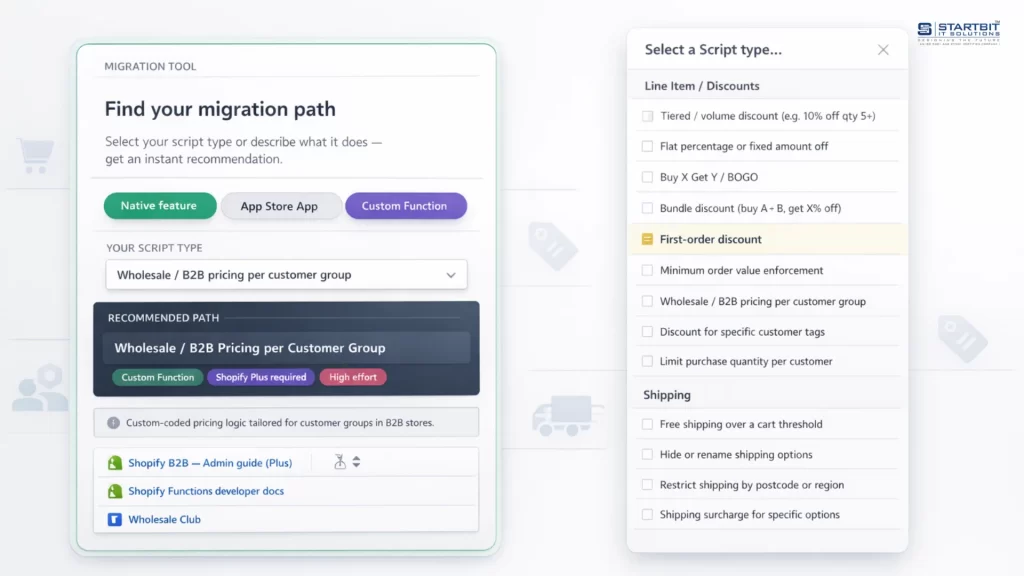
Shopify Scripts to Functions migration path finder
There are three paths for replacing a Script with a Function: use a native Shopify feature, install an App Store app, or build a custom Function. Which one fits depends on what your Script actually does. Use the tool below to find out.
What are Shopify Scripts and Functions?
- Shopify Scripts is the legacy method that Shopify Plus merchants have used to customize the checkout experience. Written in Ruby inside the Script Editor app, Scripts intercept the checkout process and apply custom logic.
- Shopify Functions is the replacement framework. Instead of Ruby scripts running inside a Shopify-managed editor, Functions are programs written in JavaScript (or Rust, for performance-critical use cases) that compile to Web Assembly (Wasm) and run on Shopify’s infrastructure.
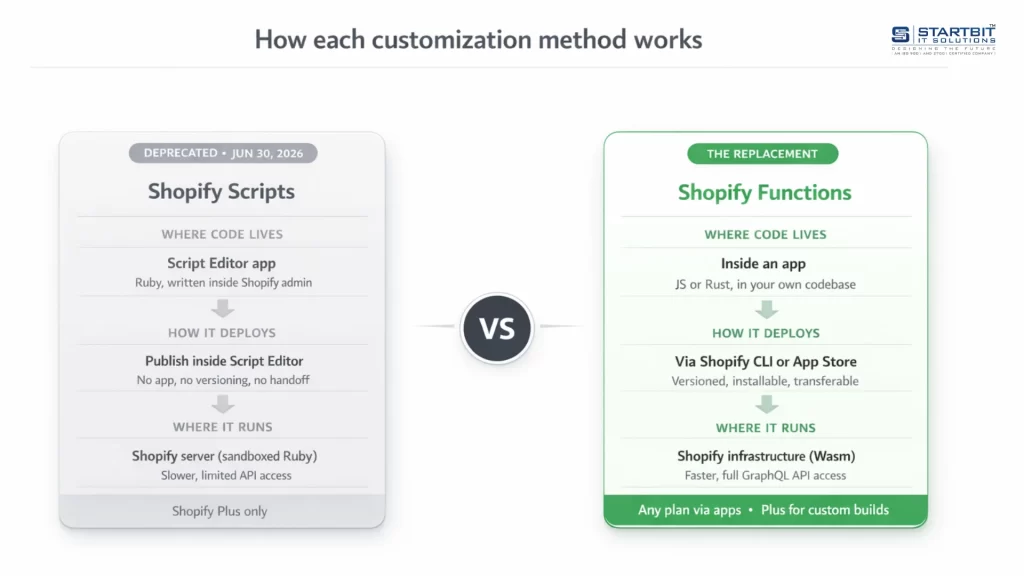
The main differences between Shopify Scripts and Functions.
Shopify Scripts vs Shopify Functions (Quick Comparison)
| Feature | Shopify Scripts | Shopify Functions |
|---|---|---|
| Language | Ruby | JavaScript / Rust |
| Speed | Moderate | High-performance |
| Integration | Limited | Strong ecosystem |
| Scalability | Restricted | Highly scalable |
| Future | Deprecated | Shopify’s future |
The takeaway is simple:
Functions are not optional – they are the future of Shopify checkout.
How to migrate from Scripts to Functions
Step 1: Find and Understand All Your Scripts
Before you replace anything, you need to know exactly what exists.
Shopify introduced a helpful tool called the Scripts Customizations Report. You can find it here:
Shopify Admin → Settings → Checkout
This report shows:
- Active Scripts
- What they do
- Suggested ways to replace them
If you don’t see the report, you’ll need to manually check your checkout.
That means testing things like:
- Discounts
- Shipping rules
- Payment options
If something changes based on conditions, there’s probably a Script behind it. Missing even one Script can cause problems later, so this step is extremely important.
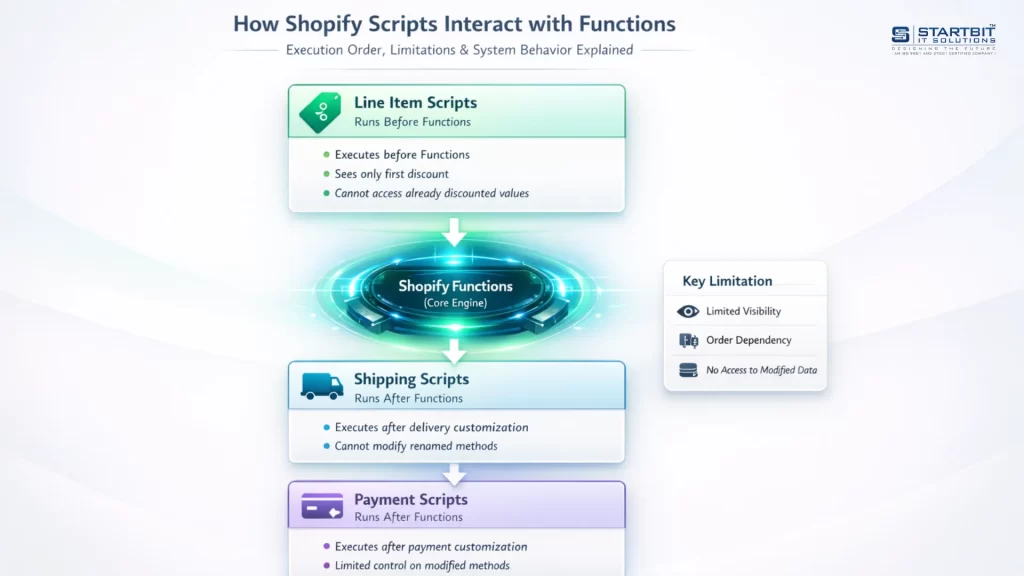
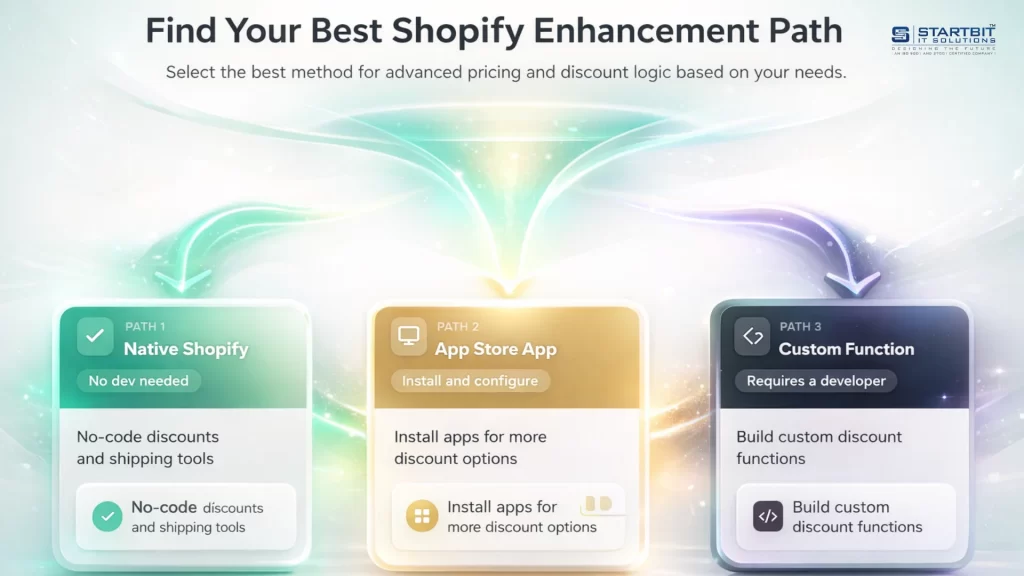
Step 2: Choose the Right Way to Replace Each Script
Not every Script needs custom coding. In fact, many can be replaced more easily than you think.
There are three main options:
1. Use Shopify’s Built-in Features
Shopify has improved a lot over the years. Many things that once required Scripts can now be done natively.
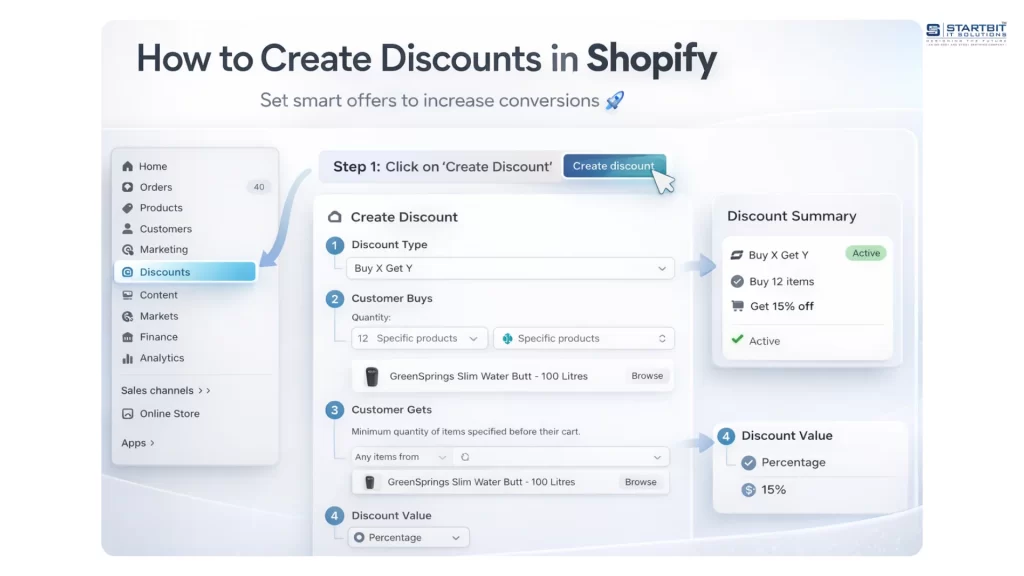
For example:
- Percentage discounts
- Free shipping rules
- Basic promotions
This is the easiest and safest option.
2. Use Shopify Apps
If your needs are a bit more advanced, apps are a great solution.
Apps can handle:
- Complex discount rules
- Advanced shipping logic
- Checkout customization
They’re faster to implement and usually come with support.
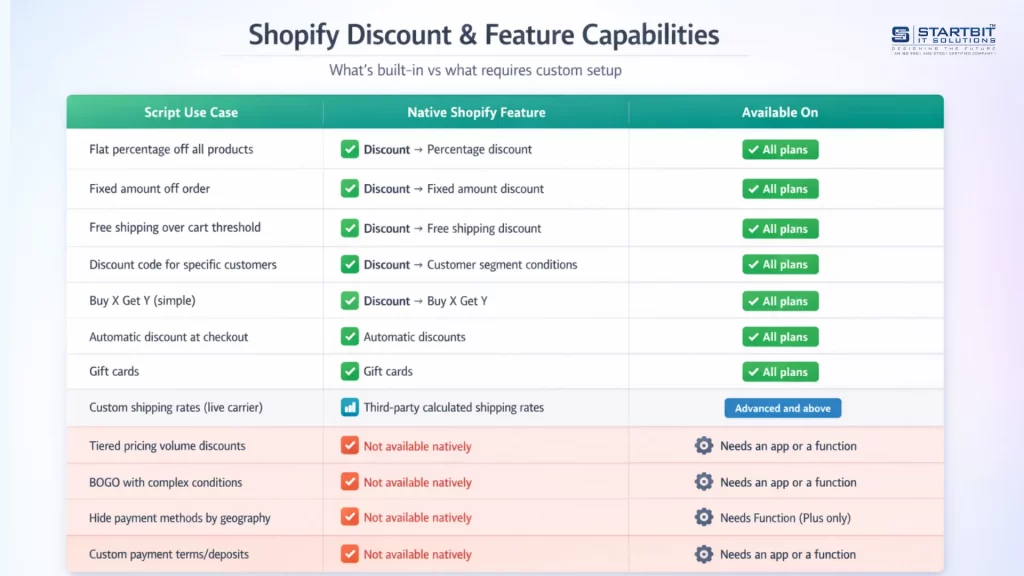
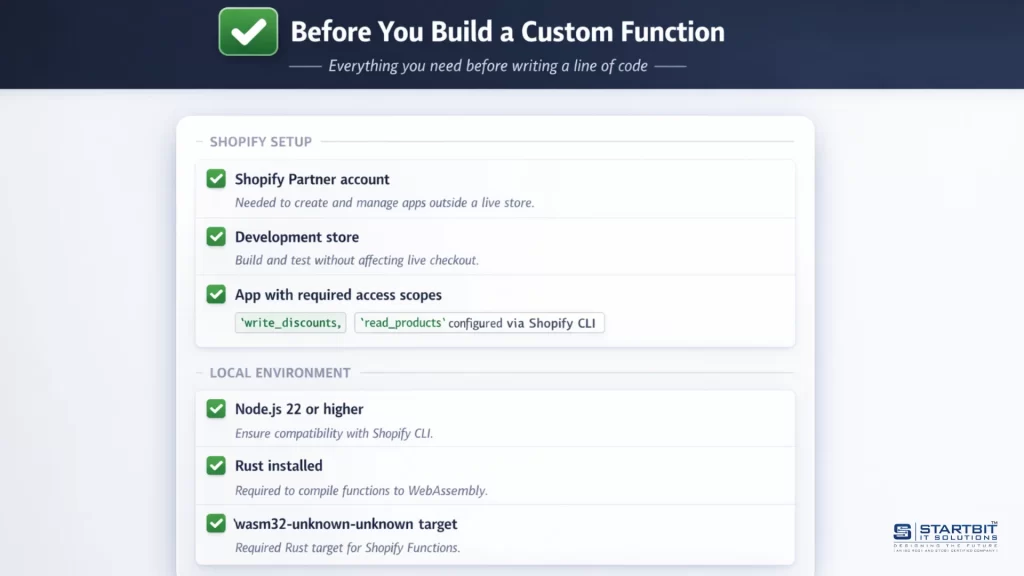
3. Build Custom Shopify Functions
If your store has unique requirements, you may need a custom Function. This gives you full control, but it requires development work.
Use this option only when:
- Native features don’t work
- Apps can’t solve your problem
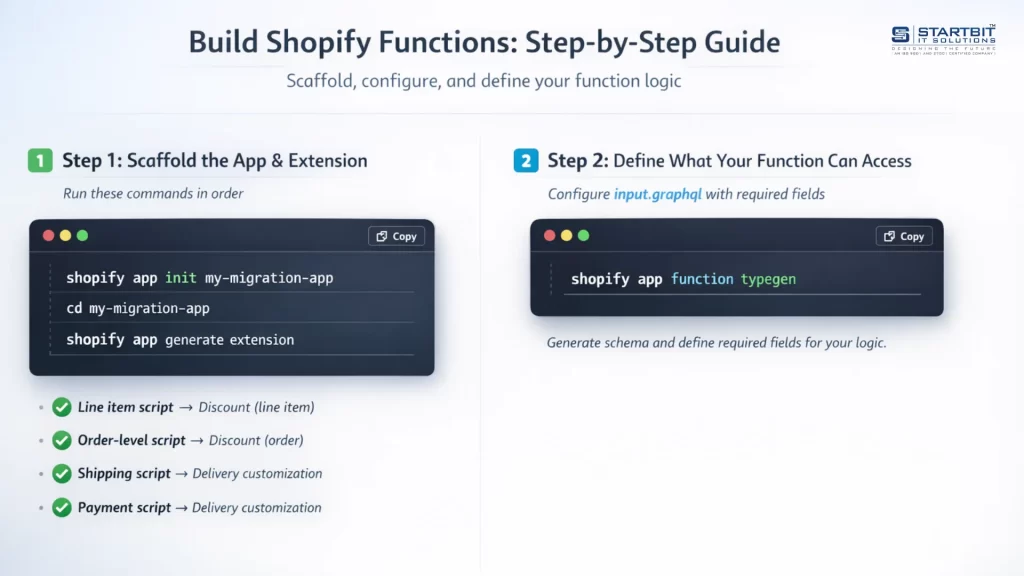
Step 3: Test Everything Carefully
Testing is where most people make mistakes. You shouldn’t just check if things “work” – you need to test all possible scenarios.
That includes:
- Different customers (new vs returning)
- Different cart sizes
- Different locations
- Edge cases (like combining discounts)
Why does this matter?
Because customers don’t follow perfect paths. They try unexpected combinations, and your checkout needs to handle all of them.
A small mistake here can lead to lost revenue or customer frustration.
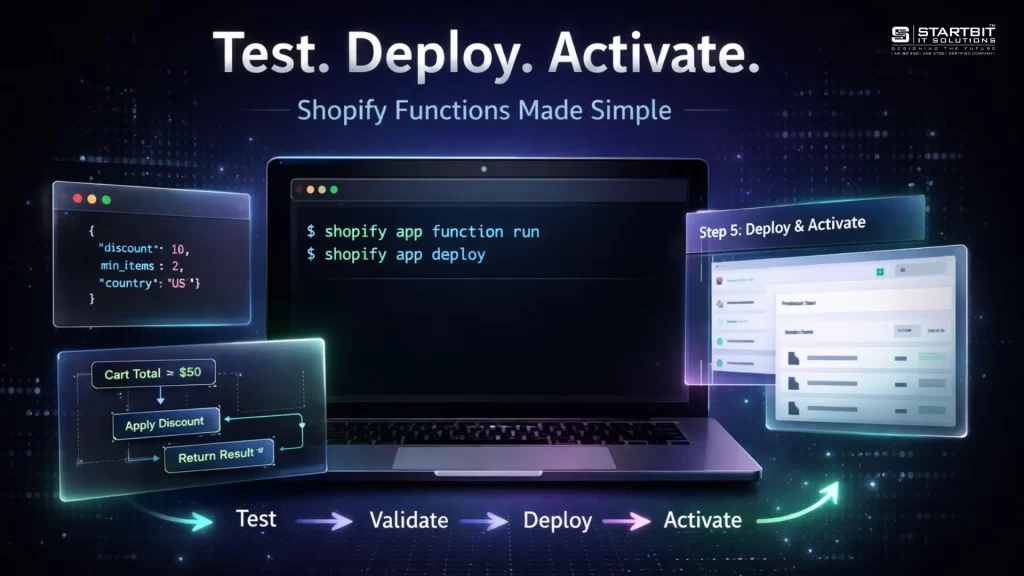
Common Problems (And How to Avoid Them)
Many Shopify Plus merchants run into similar issues during migration.
Here are the most common ones:
1. Forgotten Scripts
Old Scripts still running in the background
→ Fix: Do a full audit
2. Overlapping Logic
Multiple Scripts doing similar things
→ Fix: Simplify and combine logic
3. Missing Features
The new system doesn’t match the old behavior
→ Fix: Use apps or custom Functions
4. Poor Testing
Only basic scenarios tested
→ Fix: Test edge cases thoroughly
Conclusion
The Shopify Scripts to Functions migration is not something you can delay or ignore. Once the deadline passes, Scripts will stop working completely—and any missing logic will directly impact your checkout.
But this isn’t just about avoiding problems.
It’s also an opportunity to improve your store:
- Faster checkout
- Cleaner logic
- Better integrations
- More scalable setup
If you start early and follow a structured approach, the migration becomes manageable – and even beneficial.
Need Help?
Startbit IT Solutions helps Shopify Plus brands migrate from Scripts to Functions smoothly – without breaking checkout or losing revenue.
FAQs
Yes, after June 30, 2026, they stop completely.
No, you must do it manually.
Yes, they are faster and more flexible.
Only for complex custom Functions.
Missing a Script or not testing properly.