

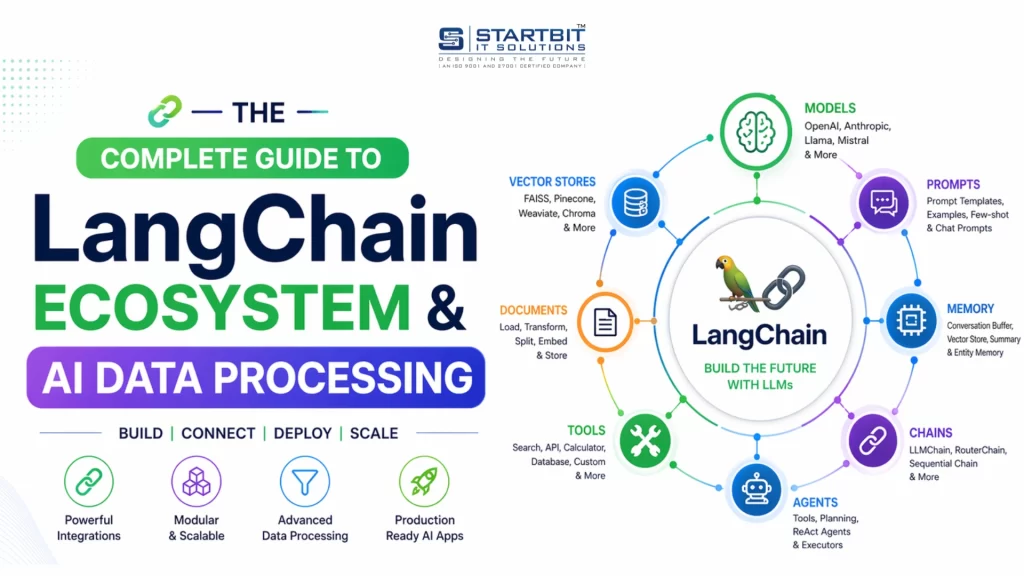
This LangChain tutorial will help you understand how to build AI-powered applications step by step. Today, creating smart AI systems is not just about using a model – it’s about building workflows, managing data, and deploying scalable solutions.
In this guide, you’ll learn how LangChain works, how to debug using LangSmith, and how to deploy APIs with LangServe. You’ll also understand key concepts like data ingestion, text chunking, embeddings, and vector databases.
What is LangChain? (LangChain Explained)
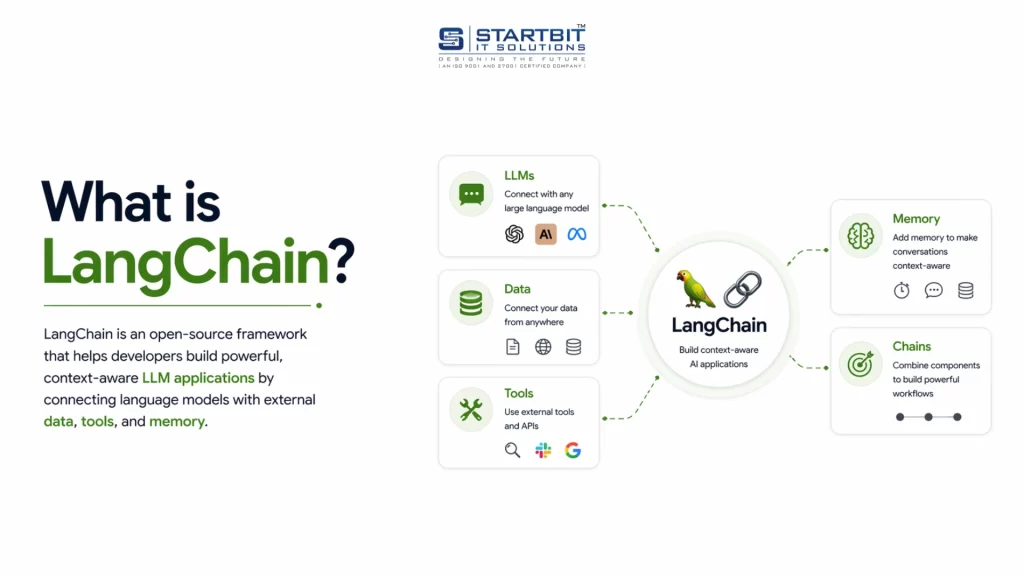
LangChain is a powerful framework used to build AI applications.
It allows you to connect models like OpenAI and Claude, create workflows, and manage prompts, memory, and tools.
What You Can Do with LangChain
- Build AI chatbots
- Create automated workflows
- Develop intelligent agents
Example Workflow
User Question → AI → Database → AI → Final Answer
What is LangSmith? (AI Debugging & Monitoring)
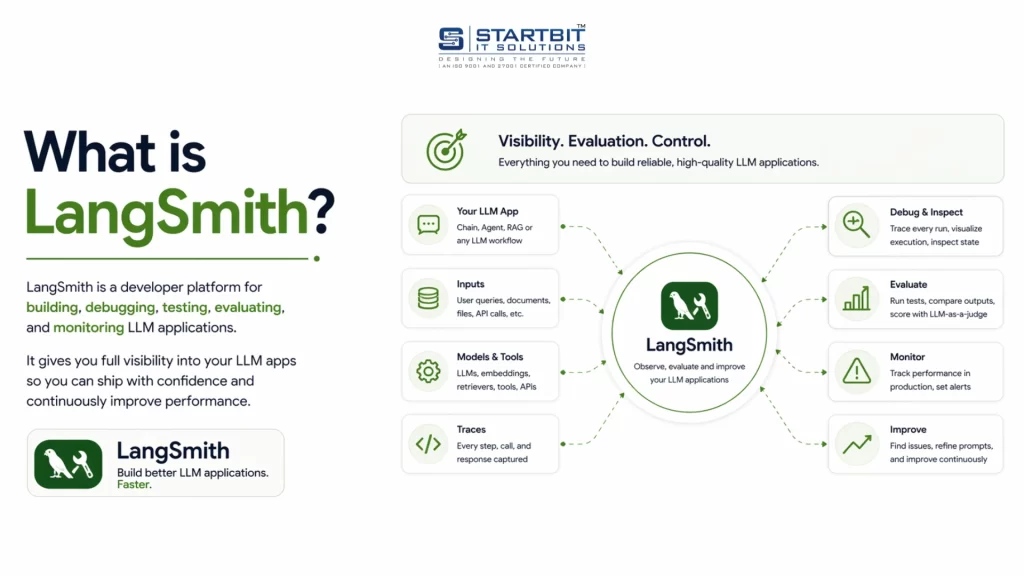
LangSmith is used to debug and monitor AI applications.
Key Features
- Logs every AI request
- Shows prompts and responses
- Helps fix incorrect outputs
- Tracks performance
Example
If your AI gives a wrong answer, you can analyze it using LangSmith logs.
This makes it essential for AI performance monitoring and debugging.
What is LangServe? (Deploy AI APIs)
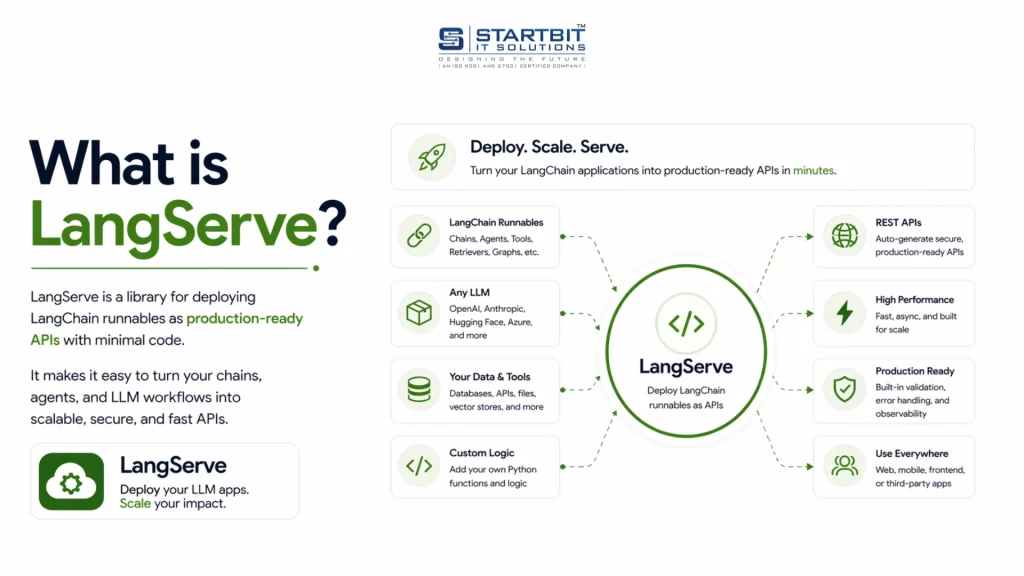
LangServe helps you deploy AI applications as APIs.
It is built on FastAPI, making integration with frontend apps easy.
What It Does
- Converts AI logic into API endpoints
- Enables frontend-backend communication
- Simplifies deployment
Example
POST /chat → returns AI response
LangChain vs LangSmith vs LangServe
Understanding the difference is simple:
- LangChain → Build AI logic
- LangSmith → Debug & monitor
- LangServe → Deploy as API
Simple Analogy
- LangChain = Engine
- LangSmith = Dashboard
- LangServe = Delivery system
AI Data Pipeline Explained (Step-by-Step)
To build powerful AI applications like chatbots, you need a strong AI data pipeline.
1. Data Ingestion in AI
Data ingestion is the process of collecting and loading data into your system.
Examples
- PDFs
- Websites
- Documents
- Databases
This is the first step in any AI data pipeline, explained simply.
2. Text Chunking in NLP
Text chunking means splitting large data into smaller parts.
Why It Matters
- AI models have input limits
- Smaller chunks improve accuracy
Example
A large document is split into multiple smaller sections.
This improves vector search in AI.
3. Embeddings Explained
Embeddings convert text into numerical vectors.
Example
“AI is powerful” → [0.23, -0.91, 0.44, …]
Key Concept
Similar meaning → Similar vectors
This is the core of embeddings, explained in simple terms.
4. Vector Database Explained
A vector database stores embeddings for fast similarity search.
Popular Tools
- Pinecone
- Weaviate
- Chroma
- FAISS
These tools power how vector databases work in AI.
How It All Works Together
A modern AI application follows a structured pipeline to deliver accurate, context-aware responses. Below is a clear breakdown of each stage and how they connect.
- Data Ingestion: The process begins by collecting data from multiple sources, such as documents, websites, PDFs, or databases. This step ensures that all relevant information is available within the system for further processing.
- Text Chunking: Since large documents cannot be processed efficiently in a single pass, the data is divided into smaller, meaningful segments called chunks. This improves processing efficiency and enables more precise retrieval later.
- Embedding Generation: Each chunk is converted into a numerical representation known as an embedding using models from platforms like OpenAI. These embeddings capture the semantic meaning of the text, allowing the system to compare content based on context rather than exact keywords.
- Vector Storage: The generated embeddings are stored in a vector database such as Pinecone or FAISS. These databases are optimized for similarity search, enabling fast retrieval of relevant information.
Query Processing Flow
When a user submits a query, the system follows these steps:
- Query Embedding: The user’s question is converted into an embedding using the same model used for the stored data. This ensures consistency in comparison.
- Similarity Search: The system compares the query embedding with stored embeddings in the vector database to identify the most relevant matches based on semantic similarity.
- Data Retrieval: The top matching chunks are retrieved from the database. These contain the most relevant information needed to answer the query.
- Response Generation: The retrieved data is passed to an AI model such as OpenAI or Claude, which generates a final, coherent response based on both the query and the retrieved context.
Final Summary
LangChain Ecosystem
The LangChain ecosystem provides a complete framework for building, managing, and deploying AI applications.
- LangChain is used to build the core logic of AI applications, including workflows, agents, and prompt handling.
- LangSmith helps monitor performance, debug issues, and track AI responses for better reliability.
- LangServe enables deployment by converting AI logic into API endpoints for seamless integration with frontend systems.
Together, these tools cover the full lifecycle of an AI application—from development to monitoring and deployment.
AI Data Pipeline
An effective AI system depends on a structured data pipeline that ensures accurate and relevant responses.
- Data Ingestion: Collects and loads data from various sources into the system.
- Text Chunking: Breaks large content into smaller, manageable sections for efficient processing.
- Embeddings: Converts text into numerical vectors to represent semantic meaning.
- Vector Database: Stores these vectors and enables fast, similarity-based search.
This pipeline allows the system to retrieve the most relevant information and generate context-aware responses efficiently.
Conclusion
This LangChain tutorial clearly explains how modern AI applications are built using tools like LangChain, LangSmith, and LangServe. From building AI logic to monitoring performance and deploying APIs, each tool plays a crucial role. Along with this, understanding the AI data pipeline – data ingestion, text chunking, embeddings, and vector databases – helps you create more accurate and scalable AI systems.
If you’re planning to build or scale AI solutions and need expert guidance, feel free to contact Startbit IT Solutions.