SameSite Cookie & Shopify Apps

SameSite Cookie & Shopify Apps

Blog, Ruby on Rails, Shopify
With the release of Chrome 80 on February 4th, 2020, the default behaviour of Chrome will change from allowing cookies in a cross-site or third-party context to denying them, unless specific attributes are included as a part of the cookie. The new version of Google Chrome will be blocking 3rd party cookies, and hence breaks lots of Shopify apps. In May 2019 Google announced that cookies that do not include the "SameSite=None" and Secure" labels will not be accessible by any third parties, in Chrome version 80 and further. The Secure label means cookies need to be set and read via HTTPS connections. SameSite prevents the browser from sending this cookie along with cross-site requests. The main goal is mitigate the risk of cross-origin information leakage. It also provides some…
Read More
SameSite cookie updates by Chrome

SameSite cookie updates by Chrome

Blog, Tips
Google Said: In May 2019 Google announced that cookies that do not include the "SameSite=None" and Secure" labels will not be accessible by any third parties, in Chrome version 80 and further. The Secure label means cookies need to be set and read via HTTPS connections. Chrome SameSite cookie default is: "None" which allows third-party cookies to track users across sites. But from February 4 2020, cookies will default into "SameSite=Lax" which means cookies are only set when the domain in the URL of the browser matches the domain of the cookie. Any cookie with the "SameSite=None" label must also have a secure flag, meaning it will only be created and sent through requests made over HTTPs. Meanwhile, the “SameSite=Strict” designation restricts cross-site sharing altogether, even between different domains that…
Read More

Happy New Year 2020

Blog
“As the new year renews all the happiness and good tidings, hope the joyful spirit keeps glowing in your heart forever! Happy New Year!” “Everything about the future is uncertain, but one thing is for sure that God had already planned all our tomorrows, we just have to trust him today, We heartily wish a beautiful tomorrow for you and your family. Happy New Year 2019!”
Read More

Woocommerce Admin

Blog
Woocommerce team created the new plugin for the wordpress in which we can find a new JavaScript-driven interface for managing your store. The plugin includes new and improved reports, and a dashboard to monitor all the important key metrics of your site. WooCommerce Admin has been translated into 4 locales. Anyway, this is a good start, as they write on its plugin page header: Test drive the future of WooCommerce. A quicker, JavaScript-powered interface with exciting new features. So I totally believe that the developer team is already focused on optimizing the speed issue, good job! Highlights Dashboard Customization For a while now you have been able to chose which charts, summary numbers, and leaderboards are displayed on your dashboard – but now you can change the order in which…
Read More

How to setup PayPal Express Checkout payment for India sellers?

Blog
PayPal Express Checkout payment is available in India selling in Indian Rupees (INR) or United States Dollars (USD). You can now add PayPal as an option during the payment step in the checkout process in India. Add the buttons to your website Now that you've seen the Smart Payment Buttons in action, add the button code to your website. Copy and paste this code into an HTML page and view it in your browser. You'll use the code to start a basic integration. For Smart Button Integrate in Website: https://developer.paypal.com/docs/checkout/integrate/ In shopify we can add the paypal by follow these steps Steps: From your Shopify admin, go to Settings > Payment providers.In the PayPal section, select your PayPal account type.Click Activate.Enter the email address for your PayPal account, then click Next.Enter the password for your PayPal account,…
Read More
How to secure WordPress without using plugin?

How to secure WordPress without using plugin?

PHP, Plugins, Tutorials, Web Design & Programming, Web Development Services, WordPress, wordpress plugins
WordPress is a very popular CMS and that's why it is highly targeted by hackers. Although latest updates have made it one of the most used tools for e-commerce website, news portals or a business blog. There are a many ways to protect your WordPress Blog from being hacked. We have collected some of the best practices which will help you to Secure your WordPress Website : Disable File Editing: Using the below code we can disable the File editor of admin side so hacker will not able to open the files if he/she want to do any change in file. By default Wordpress allows user to edit the file using the editor through the admin panel. define('DISALLOW_FILE_EDIT',true); Protect your .htaccess file .htaccess is a important file of Wordpress. .htaccess…
Read More
Default Routing In Codeigniter

Default Routing In Codeigniter

Blog, PHP, PHP Scripts, Techniques, Web Design & Programming
One of the most common problem that a beginner faces with codeigniter is the presence of index.php in the URL just before the name of the controller. This makes the URL look odd. Also, whenever developers are trying to form a link during the development of a project, it becomes mandatory for the developer to add index.php in the URL otherwise the application does not work and keeps on providing a 404 Error (Not FOund). So, in order to make the URL of the codeigniter user friendly , we can use .htaccess file. This .htaccess file helps us in changing the default routing behavior of Codeigniter. This .htaccess file contains some line of code which can help us achieve our target and it is placed in the root directory of…
Read More

How to create custom slider using simple Jquery and CSS ?

Blog, HTML5, News
First we will create a section of slider content where we will put the content of slider. Slider heading and content will change on mouser hover. Also we can change slider content using hover functionality or click functionality only need to do simple change like only need to change hover text to click text. In the below code of slider. There are three li label(2012, 2000 and 1999). When user will hover on these label of li then the content of related these li label will automatically change on hover effect. We have three tab panel and we have content in panel according to li labels. Like if you want to change the content of 2012 then change the inner content of li's id "ert_pane1-0" so this is the same…
Read More
Add a size chart to product pages

Add a size chart to product pages

Blog, News, Shopify
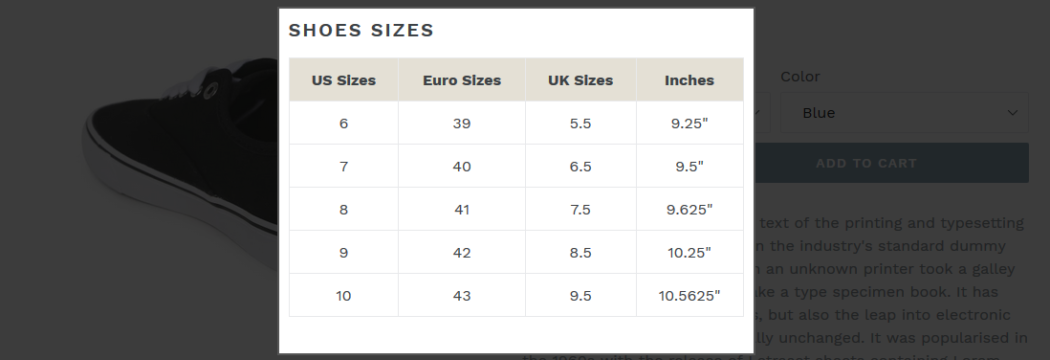
Some wearable items like shirts, jeans, shoes etc. are available in different sizes according to consumer's requirements. Showing a size chart on related products is a plus point for website owner and customer as well. Now we would like to describe you steps through which you can add size chart option on product page. First we will create a size chart page with using below steps: Login in your Shopify admin panelGo to Online Store > Pages.Click Add page.Add page title "Size Chart"On this page, you can add either a table or an image with the size chart you want to use.Set Visibility as "Visible".Click on "Save" button to save this page. Now we will show the steps to add this size chart to your theme's product page: In Shopify…
Read More
How to create WordPress Multilingual Blog?

How to create WordPress Multilingual Blog?

Blog, News, Plugins, WordPress, wordpress plugins
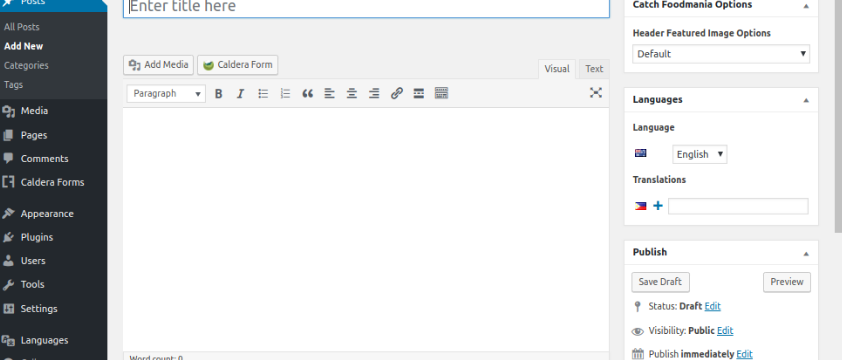
By default Wordpress doesn't support a multilingual blog but there are many plugins has been developed by the WordPress community which can give you facility to create a multilingual blog easily. We can setup multi-site using single plugin for each language. You will be able to easily translate your WordPress posts, pages, tags, categories, and themes into as many languages as you want. We can follow common methods by WordPress multilingual site owners. The first method allows you to translate manually all the content in your chosen languages. The second method does not actually create a multilingual site, but instead it adds machine translations of your existing content by using the Google Translate service. There are various plugin to convert site in multi language. 1) https://wordpress.org/plugins/multilanguage/ 2) https://wordpress.org/plugins/loco-translate/ 3) https://wpml.org/…
Read More