How to create custom slider using simple Jquery and CSS ?

Blog, HTML5, News
First we will create a section of slider content where we will put the content of slider. Slider heading and content will change on mouser hover. Also we can change slider content using hover functionality or click functionality only need to do simple change like only need to change hover text to click text. In the below code of slider. There are three li label(2012, 2000 and 1999). When user will hover on these label of li then the content of related these li label will automatically change on hover effect. We have three tab panel and we have content in panel according to li labels. Like if you want to change the content of 2012 then change the inner content of li's id "ert_pane1-0" so this is the same…
Read More
Add a size chart to product pages

Add a size chart to product pages

Blog, News, Shopify
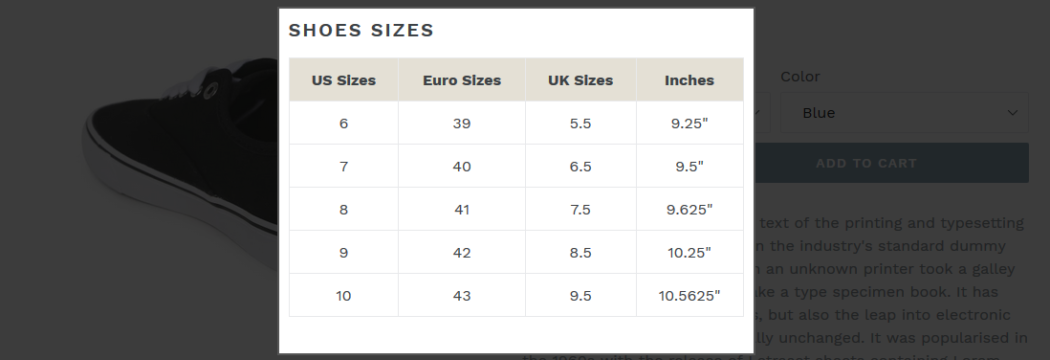
Some wearable items like shirts, jeans, shoes etc. are available in different sizes according to consumer's requirements. Showing a size chart on related products is a plus point for website owner and customer as well. Now we would like to describe you steps through which you can add size chart option on product page. First we will create a size chart page with using below steps: Login in your Shopify admin panelGo to Online Store > Pages.Click Add page.Add page title "Size Chart"On this page, you can add either a table or an image with the size chart you want to use.Set Visibility as "Visible".Click on "Save" button to save this page. Now we will show the steps to add this size chart to your theme's product page: In Shopify…
Read More
How to create WordPress Multilingual Blog?

How to create WordPress Multilingual Blog?

Blog, News, Plugins, WordPress, wordpress plugins
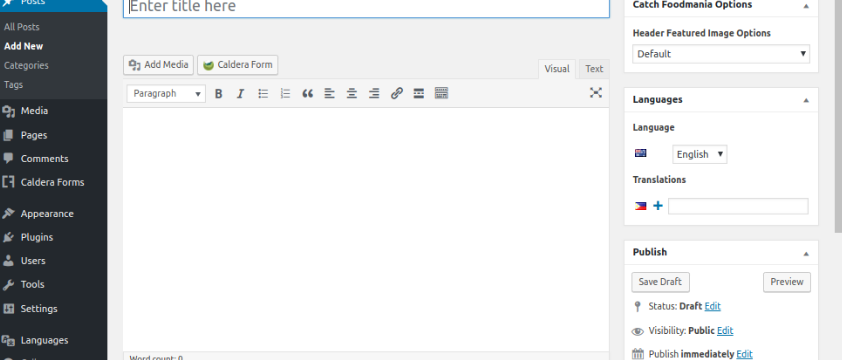
By default Wordpress doesn't support a multilingual blog but there are many plugins has been developed by the WordPress community which can give you facility to create a multilingual blog easily. We can setup multi-site using single plugin for each language. You will be able to easily translate your WordPress posts, pages, tags, categories, and themes into as many languages as you want. We can follow common methods by WordPress multilingual site owners. The first method allows you to translate manually all the content in your chosen languages. The second method does not actually create a multilingual site, but instead it adds machine translations of your existing content by using the Google Translate service. There are various plugin to convert site in multi language. 1) https://wordpress.org/plugins/multilanguage/ 2) https://wordpress.org/plugins/loco-translate/ 3) https://wpml.org/…
Read More
How to add Google Analytics on Shopify Store?

How to add Google Analytics on Shopify Store?

News, Shopify, WordPress
Google Analytics is an easy and free web analytics service which help to track and analyze visitors on your website and provide detailed statistics about the traffic and sources of traffic for a website. Here we would like to show you steps to use Google Analytics for your Shopify website. Please login in your Shopify admin panel, go to online store which you can find on left sidebar Step #1 : Please login in your Shopify admin panel, go to online store which you can find on left sidebar Step#2 : Click on Preferences under online store Step#3 : On right side, you will see option to enter Google Analytics code Step#4 : Paste yours google analytics code in text-area and press Save button. You will see this section like…
Read More
GraphQL Admin API

GraphQL Admin API

News, Shopify
The GraphQL Admin API lets you build apps and other integrations for the Shopify admin using GraphQL. With the API, you can create apps that offer functionality at every stage of a store’s operation, including shipping, fulfillment and product management. Few Quick Starting Points: An endpoint of GraphQL https://my-store-name.myshopify.com/admin/api/graphql How to get Access Token? Login to your Shopify store and create a Private app in apps section and allow this new app to access your storefront data using the Storefront API. How to test API GraphQL endpoint? Test GraphQL by using the GraphiQL app and be sure that it works well for every aspect. How to use JavaScript with Storefront API GraphQL? There are many methods by which you can use GraphQL in shopify, and from those one is using…
Read More
How to write a Generic Responsive CSS for all devices in the world?

How to write a Generic Responsive CSS for all devices in the world?

Android, APPS, Mobile Application Development, Mobile Applications, Mobile Apps
A major component of responsive design is creating the right experience for the right device. We've rounded up media queries that can be used to target designs for many standard and popular devices that is certainly worth a read. If you're looking for a comprehensive list of media queries, http://cssmediaqueries.com/ is a good resource. Here is generic CSS for possible all devices Phones and Handhelds iPhones / ----------- iPhone 4 and 4S ----------- / / Portrait and Landscape / @media only screen and (min-device-width: 320px) and (max-device-width: 480px) and (-webkit-min-device-pixel-ratio: 2) { } / Portrait / @media only screen and (min-device-width: 320px) and (max-device-width: 480px) and (-webkit-min-device-pixel-ratio: 2) and (orientation: portrait) { } / Landscape / @media only screen and (min-device-width: 320px) and (max-device-width: 480px) and (-webkit-min-device-pixel-ratio: 2) and (orientation:…
Read More
Hybrid Mobile App Technologies

Hybrid Mobile App Technologies

APPS, Blog, Mobile Application Development, Mobile Applications, Mobile Apps
The term “hybrid development” speaks for itself: The approach which combines native code with independent code that is suitable for multiple platforms and allows creating cross-platform mobile apps. These applications fit any platform and function identically across different ones. Hybrid software is coded in intermediate programming languages — HTML, JavaScript and CSS — those that are not native to devices and OSs. Then, apps are packaged into native containers and integrated into platforms. They have a native look and feel. however, there are typically certain restrictions that concern control and navigational elements. The main advantages of the hybrid approach over the native one are as follows: Hybrid solutions require fewer efforts and provide more accurate resultsBasic knowledge of standard languages is enough — development tools will do the rest of the workCosts are reduced, since only…
Read More
Ruby on Rails aka (RoR)

Ruby on Rails aka (RoR)

Ruby on Rails
Ruby on Rails aka (RoR) is a web development framework which gives Web developers a time saving method for writing code. Rails is one of many web frameworks used in app programming and web development. The Rails framework helps developers to build websites and applications, because it abstracts and simplifies common repetitive tasks. Ruby on Rails is web application framework written in Ruby by "David Heinemeier Hansson". Ruby is a combination of: Smalltalk's conceptual elegance,Python's ease of use and learning, andPerl's pragmatism. Ruby is: A high-level programming language.Interpreted like Perl, Python, Tcl/TK.Object-oriented like Smalltalk, Eiffel, Ada, Java. By using Rails code developers keep their overall work cleaner, less prone to bugs and easier to troubleshoot when problems do occur. Rails works with many database systems like MySql, PostgreSQL, SQLite, Oracle,…
Read More
Gutenberg Editor

Gutenberg Editor

CMS, Free WordPress Plugins, Plugins, WordPress, wordpress plugins
The TinyMCE WordPress visual editor hasn’t had many changes over the past few years and has stayed pretty much the same for a long time. To make adding rich content to WordPress simple and enjoyable WordPress CORE Team have introduced this new feature. The Gutenberg WordPress editor is a new page builder that is being designed to integrate with WordPress core. Gutenberg ads various types of content blocks such as images, headings, text, list, videos and provides a page builder-like functionality to Wordpress based websites. The Gutenberg WordPress editor is Named after Johannes Gutenberg, who invented the mechanical printing press. Gutenberg was introduced to the world by Matt Mullenweg at WordCamp Europe in 2017. Gutenberg is released with WordPress 5.0. The main goal is to have an interface that is…
Read More

What’s New in WordPress 5.0?

Blog
WordPress is now changed forever. WordPress’ updated to version 5.0 is out now and is now with a whole new way to compose blog posts and pages.If you’ve been to your WordPress dashboard today, you’ve likely noticed a new (major) update waiting for you. Big changes to your favorite CMS can be difficult to accept. However, even massively popular platforms such as WordPress need to adapt to the times. "Gutenberg" is a bold leap forward, and it’s not the only update that’s coming up.   What is Gutenberg? Gutenberg is WordPress’ new version its an attempt to keep up with the growth of popular DIY site builders like Weebly, Squarespace, and Wix. The classic WordPress editor is now old. Not having a common feature of drag and drop, it gets…
Read More